Java ExecutorService
Jakob Jenkov |
The Java ExecutorService interface, java.util.concurrent.ExecutorService, represents an
asynchronous execution mechanism which is capable of executing tasks concurrently in the background.
In this Java ExecutorService tutorial I will explain how to create a ExecutorService,
how to submit tasks for execution to it, how to see the results of those tasks, and how to shut down the
ExecutorService again when you need to.
Java ExecutorService Video Tutorial
If you prefer video, I have a video introduction to the here:
Task Delegation
Here is a diagram illustrating a thread delegating a task to a Java ExecutorService for asynchronous execution:
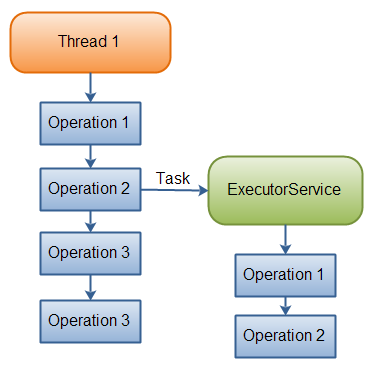 |
| A thread delegating a task to an ExecutorService for asynchronous execution. |
Once the thread has delegated the task to the ExecutorService, the thread continues its own execution
independent of the execution of that task. The ExecutorService then executes the task concurrently,
independently of the thread that submitted the task.
Java ExecutorService Example
Before we get too deep into the ExecutorService, let us look at a simple example.
Here is a simple Java ExecutorService example:
ExecutorService executorService = Executors.newFixedThreadPool(10);

executorService.execute(new Runnable() {
    public void run() {
        System.out.println("Asynchronous task");
    }
});

executorService.shutdown();
First an ExecutorService is created using the Executors newFixedThreadPool()
factory method. This creates a thread pool with 10 threads executing tasks.
Second, an anonymous implementation of the Runnable interface is passed
to the execute() method. This causes the Runnable to be executed
by one of the threads in the ExecutorService.
You will see several more examples of how to use the ExecutorService throughout this tutorial.
This example just served to give you a quick overview of how using an ExecutorService to
execute tasks in the background looks like.
Java ExecutorService Implementations
The Java ExecutorService is very similar to a thread pool.
In fact, the implementation of the ExecutorService interface present in the
java.util.concurrent package is a thread pool implementation. If you want to understand how the
ExecutorService interface can be implemented internally, read the above tutorial.
Since ExecutorService is an interface, you need to its implementations in order
to make any use of it. The ExecutorService has the following implementation in the java.util.concurrent
package:
Creating an ExecutorService
How you create an ExecutorService depends on the implementation you use. However, you can
use the Executors factory class to create ExecutorService instances too.
Here are a few examples of creating an ExecutorService:
ExecutorService executorService1 = Executors.newSingleThreadExecutor();

ExecutorService executorService2 = Executors.newFixedThreadPool(10);

ExecutorService executorService3 = Executors.newScheduledThreadPool(10);
Creating an ExecutorService That Uses Virtual Threads
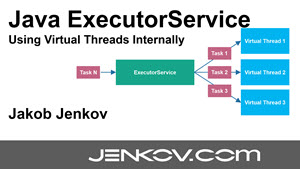
Java virtual threads were added to Java in Java 19. It is also possible to create a Java ExecutorService that uses virtual threads internally. Here is an example of creating a Java ExecutorService that starts a new virtual thread for each task submitted to it:
ExecutorService executor = Executors.newVirtualThreadPerTaskExecutor();
ExecutorService Usage
There are a few different ways to delegate tasks for execution to an ExecutorService:
- execute(Runnable)
- submit(Runnable)
- submit(Callable)
- invokeAny(...)
- invokeAll(...)
I will take a look at each of these methods in the following sections.
Execute Runnable
The Java ExecutorService execute(Runnable) method takes a java.lang.Runnable object,
and executes it asynchronously. Here is an example of executing a Runnable with an ExecutorService:
ExecutorService executorService = Executors.newSingleThreadExecutor();

executorService.execute(new Runnable() {
    public void run() {
        System.out.println("Asynchronous task");
    }
});

executorService.shutdown();
There is no way of obtaining the result of the executed Runnable, if necessary. You will have to use
a Callable for that (explained in the following sections).
Submit Runnable
The Java ExecutorService submit(Runnable) method also takes a Runnable implementation, but returns
a Future object. This Future object can be used to check if the Runnable
has finished executing.
Here is a Java ExecutorService submit() example:
Future future = executorService.submit(new Runnable() {
    public void run() {
        System.out.println("Asynchronous task");
    }
});

future.get();  //returns null if the task has finished correctly.
The submit() method returns a Java Future object which can be used to
check when the Runnable has completed.
Submit Callable
The Java ExecutorService submit(Callable) method is similar to the submit(Runnable)
method except it takes a Java Callable instead of a Runnable. The precise difference between
a Callable and a Runnable is explained a bit later.
The Callable's result can be obtained via the Java Future object returned by the
submit(Callable) method. Here is an ExecutorService Callable example:
Future future = executorService.submit(new Callable(){
    public Object call() throws Exception {
        System.out.println("Asynchronous Callable");
        return "Callable Result";
    }
});

System.out.println("future.get() = " + future.get());
The above code example will output this:
Asynchronous Callable
future.get() = Callable Result
invokeAny()
The invokeAny() method takes a collection of Callable objects, or subinterfaces
of Callable. Invoking this method does not return a Future, but returns the
result of one of the Callable objects. You have no guarantee about which of the Callable's
results you get. Just one of the ones that finish.
If one Callable finishes, so that a result is returned from invokeAny(), then the rest of
the Callable instances are cancelled.
If one of the tasks complete (or throws an exception), the rest of the Callable's are cancelled.
Here is a code example:
ExecutorService executorService = Executors.newSingleThreadExecutor();

Set<Callable<String>> callables = new HashSet<Callable<String>>();

callables.add(new Callable<String>() {
    public String call() throws Exception {
        return "Task 1";
    }
});
callables.add(new Callable<String>() {
    public String call() throws Exception {
        return "Task 2";
    }
});
callables.add(new Callable<String>() {
    public String call() throws Exception {
        return "Task 3";
    }
});

String result = executorService.invokeAny(callables);

System.out.println("result = " + result);

executorService.shutdown();
This code example will print out the object returned by one of the Callable's in the
given collection. I have tried running it a few times, and the result changes. Sometimes it is
"Task 1", sometimes "Task 2" etc.
invokeAll()
The invokeAll() method invokes all of the Callable objects you pass to
it in the collection passed as parameter. The invokeAll() returns a list of Future
objects via which you can obtain the results of the executions of each Callable.
Keep in mind that a task might finish due to an exception, so it may not have "succeeded". There is
no way on a Future to tell the difference.
Here is a code example:
ExecutorService executorService = Executors.newSingleThreadExecutor();

Set<Callable<String>> callables = new HashSet<Callable<String>>();

callables.add(new Callable<String>() {
    public String call() throws Exception {
        return "Task 1";
    }
});
callables.add(new Callable<String>() {
    public String call() throws Exception {
        return "Task 2";
    }
});
callables.add(new Callable<String>() {
    public String call() throws Exception {
        return "Task 3";
    }
});

List<Future<String>> futures = executorService.invokeAll(callables);

for(Future<String> future : futures){
    System.out.println("future.get = " + future.get());
}

executorService.shutdown();
Runnable vs. Callable
The Runnable interface is very similar to the Callable interface. The Runnable interface
represents a task that can be executed concurrently by a thread or an ExecutorService. The Callable
can only be executed by an ExecutorService. Both
interfaces only has a single method. There is one small difference between the Callable
and Runnable interface though. The difference between the Runnable and
Callable interface is more easily visible when you see the interface declarations.
Here is first the Runnable interface declaration:
public interface Runnable {
    public void run();
}
And here is the Callable interface declaration:
public interface Callable{
    public Object call() throws Exception;
}
The main difference between the Runnable run() method and the
Callable call() method is that the call() method can return
an Object from the method call. Another difference between call() and
run() is that call() can throw an exception, whereas run()
cannot (except for unchecked exceptions - subclasses of RuntimeException).
If you need to submit a task to a Java ExecutorService and you need a result from the task,
then you need to make your task implement the Callable interface. Otherwise your task can
just implement the Runnable interface.
Cancel Task
You can cancel a task (Runnable or Callable) submitted to a Java ExecutorService
by calling the cancel() method on the Future returned when the task is submitted.
Cancelling the task is only possible if the task has not yet started executing. Here is an example of cancelling
a task by calling the Future.cancel() method:
future.cancel();
ExecutorService Shutdown
When you are done using the Java ExecutorService you should shut it down, so the threads
do not keep running. If your application is started via a main() method
and your main thread exits your application, the application will keep running if you have an
active ExexutorService in your application. The active threads inside this ExecutorService
prevents the JVM from shutting down.
shutdown()
To terminate the threads inside the ExecutorService you call its shutdown() method.
The ExecutorService will not shut down immediately, but it will no longer accept new tasks, and
once all threads have finished current tasks, the ExecutorService shuts down. All tasks submitted
to the ExecutorService before shutdown() is called, are executed. Here is an example
of performing a Java ExecutorService shutdown:
executorService.shutdown();
shutdownNow()
If you want to shut down the ExecutorService immediately, you can call the shutdownNow()
method. This will attempt to stop all executing tasks right away, and skips all submitted but non-processed tasks.
There are no guarantees given about the executing tasks. Perhaps they stop, perhaps the execute until the end.
It is a best effort attempt. Here is an example of calling ExecutorService shutdownNow:
executorService.shutdownNow();
awaitTermination()
The ExecutorService awaitTermination() method will block the thread calling it
until either the ExecutorService has shutdown completely, or until a given time out occurs.
The awaitTermination() method is typically called after calling shutdown() or
shutdownNow(). Here is an example of calling ExecutorService awaitTermination():
executorService.shutdown();

executorService.awaitTermination(10_000L, TimeUnit.MILLISECONDS );
| Tweet | |
Jakob Jenkov | |














