Java IO: SequenceInputStream
Jakob Jenkov |
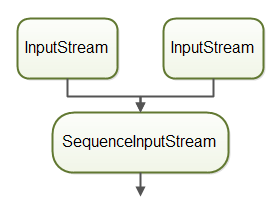
The Java SequenceInputStream combines two or more other InputStream's into one. First
the SequenceInputStream will read all bytes from the first InputStream, then all bytes
from the second InputStream. That is the reason it is called a SequenceInputStream, since
the InputStream instances are read in sequence.
SequenceInputStream Example
It is time to see an example of how to use a SequenceInputStream.
Before you can use the SequenceInputStream you must import it in your Java class.
Here is how to import a SequenceInputStream:
import java.io.SequenceInputStream;
This import statement should be at the top of your Java class, right under the package declaration.
Now let us see how to use the SequenceInputStream. Here is a simple Java SequenceInputStream
example:
InputStream input1 = new FileInputStream("c:\\data\\file1.txt");
InputStream input2 = new FileInputStream("c:\\data\\file2.txt");

SequenceInputStream sequenceInputStream =
    new SequenceInputStream(input1, input2);

int data = sequenceInputStream.read();
while(data != -1){
    System.out.println(data);
    data = sequenceInputStream.read();
}
This Java code example first creates two FileInputStream instances. The FileInputStream extends
the InputStream class, so they can be used with the SequenceInputStream.
Second, this example creates a SequenceInputStream . The SequenceInputStream is given
the two FileInputStream instances as constructor parameters. This is how you tell the SequenceInputStream
to combine two InputStream instances.
The two InputStream instances combined with the SequenceInputStream can now be used as if
it was one coherent stream. When there is no more data to read from the second InputStream, the
SequenceInputStream read() method will return -1, just like any other InputStream
does.
Combining More Than Two InputStreams
You can combine more than two InputStream instances with the SequenceInputStream
in two ways. The first way is to put all the InputStream instances into a Vector,
and pass that Vector to the SequenceInputStream constructor. Here is an example of how
passing a Vector to the SequenceInputStream constructor looks:
InputStream input1 = new FileInputStream("c:\\data\\file1.txt");
InputStream input2 = new FileInputStream("c:\\data\\file2.txt");
InputStream input3 = new FileInputStream("c:\\data\\file3.txt");

Vector<InputStream> streams = new Vector<>();
streams.add(input1);
streams.add(input2);
streams.add(input3);

SequenceInputStream sequenceInputStream =
    new SequenceInputStream(streams.elements()))

int data = sequenceInputStream.read();
while(data != -1){
    System.out.println(data);
    data = sequenceInputStream.read();
}
sequenceInputStream.close();
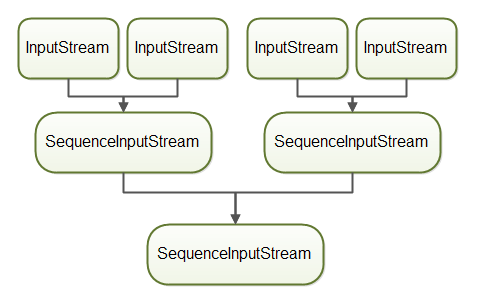
The second method is to combine the InputStream instances two and two into SequenceInputStream
instances, and then combine these again with another SequenceInputStream. Here is how combining
more than two InputStream instances with multiple SequenceInputStream instances look:
SequenceInputStream sequenceInputStream1 =
        new SequenceInputStream(input1, input2);

SequenceInputStream sequenceInputStream2 =
        new SequenceInputStream(input3, input4);

SequenceInputStream sequenceInputStream =
    new SequenceInputStream(
            sequenceInputStream1, sequenceInputStream2)){

int data = sequenceInputStream.read();
while(data != -1){
    System.out.println(data);
    data = sequenceInputStream.read();
}
sequenceInputStream.close();
The resulting object graph looks like this:
Closing a SequenceInputStream
When you are finished reading data from the SequenceInputStream you should remember to close it.
Closing a SequenceInputStream will also close the InputStream instances which the
SequenceInputStream is reading.
Closing a SequenceInputStream is done by calling its close() method. Here is how
closing a SequenceInputStream looks:
sequenceInputStream.close();
You can also use the try-with-resources construct
introduced in Java 7. Here is how to use and close a SequenceInputStream looks with the try-with-resources
construct:
InputStream input1 = new FileInputStream("c:\\data\\file1.txt");
InputStream input2 = new FileInputStream("c:\\data\\file2.txt");

try(SequenceInputStream sequenceInputStream =
    new SequenceInputStream(input1, input2)){

    int data = sequenceInputStream.read();
    while(data != -1){
        System.out.println(data);
        data = sequenceInputStream.read();
    }
}
Notice how there is no longer any explicit close() method call. The try-with-resources construct
takes care of that.
Notice also that the two FileInputStream instances are not created inside
the try-with-resources block. That means that the try-with-resources block will not automatically close these
two FileInputStream instances. However, when the SequenceInputStream is closed
it will also close the InputStream instances it reads from, so the two FileInputStream
instances will get closed when the SequenceInputStream is closed.
| Tweet | |
Jakob Jenkov | |














