JavaFX TextField
Jakob Jenkov |
A JavaFX TextField control enables users of a JavaFX application to enter text which can then be read by the
application. The JavaFX TextField control is represented by the class javafx.scene.control.TextField .
Creating a TextField
You create a TextField control by creating an instance of the TextField class.
Here is a JavaFX TextField instantiation example:
TextField textField = new TextField();
Adding a TextField to the Scene Graph
For a JavaFX TextField to be visible the TextField object must be added to the scene graph.
This means adding it to a Scene object, or as child of a layout which is attached to a Scene object.
Here is an example that attaches a JavaFX TextField to the scene graph:
package com.jenkov.javafx.controls;

import javafx.application.Application;
import javafx.scene.Scene;
import javafx.scene.control.TextField;
import javafx.scene.layout.HBox;
import javafx.stage.Stage;


public class TextFieldExperiments extends Application  {


    @Override
    public void start(Stage primaryStage) throws Exception {
        primaryStage.setTitle("HBox Experiment 1");

        TextField textField = new TextField();

        HBox hbox = new HBox(textField);

        Scene scene = new Scene(hbox, 200, 100);
        primaryStage.setScene(scene);
        primaryStage.show();

    }

    public static void main(String[] args) {
        Application.launch(args);
    }
}
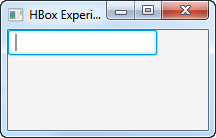
The result of running the above JavaFX TextField example is an application that looks like this:
Getting the Text of a TextField
You can get the text entered into a TextField using its getText() method which returns
a String. Here is a full example that shows a TextField and a Button
and which reads the text entered into the TextField when the button is clicked:
package com.jenkov.javafx.controls;

import javafx.application.Application;
import javafx.scene.Scene;
import javafx.scene.control.Button;
import javafx.scene.control.TextField;
import javafx.scene.layout.HBox;
import javafx.stage.Stage;


public class TextFieldExperiments extends Application  {


    @Override
    public void start(Stage primaryStage) throws Exception {
        primaryStage.setTitle("HBox Experiment 1");

        TextField textField = new TextField();

        Button button = new Button("Click to get text");

        button.setOnAction(action -> {
            System.out.println(textField.getText());
        });

        HBox hbox = new HBox(textField, button);

        Scene scene = new Scene(hbox, 200, 100);
        primaryStage.setScene(scene);
        primaryStage.show();

    }

    public static void main(String[] args) {
        Application.launch(args);
    }
}
Setting the Text of a TextField
You can set the text of a TextField using its setText() method. This is often useful
when you need to set the initial value for at text field that is part of a form. For instance, editing an existing
object or record.
Here is a simple example of setting the text of a JavaFX TextField:
textField.setText("Initial value");
| Tweet | |
Jakob Jenkov | |














